Loyalty basics
A loyalty setup is used to give a customer the opportunity to accrue points when they shop. These points can then be used by the retail outlet to reward loyal customers by allowing them to spend their points as monetary value.
Each loyalty card is attached to a loyalty scheme, which specifies its rules. Each loyalty card is also identified by which way it can be used, accruing, spending, both or blocked.
Loyalty Use
Loyalty in LS One can be used in two ways:
- Accruing points
- To accrue points, the loyalty card must be added to the POS transaction at any time before tender is used, using operation Loyalty Request or swiping a loyalty card.
- Spending points
- To spend points or use as discount, the loyalty card can be used as tender at the end of a transaction, using operation Pay Loyalty on the POS.
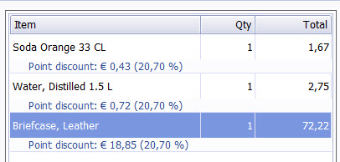
When points are being spent as discounts the discount amount is distributed on all the items and a discount line with information about the discount is displayed in the POS and printed on the receipt
So that a customer is able to collect and accrue points they need:
- The customer needs to get a loyalty card.
- A customer can have one or more cards.
- A loyalty scheme must be set up to create rules for the card.
Configuring Loyalty in LS One
For the loyalty functionality to work various settings must be set up in the Site Manager. This includes defining number sequences, creating loyalty cards (with or without customers) and creating loyalty schemes that must be attached to the loyalty card.
- Loyalty Scheme
All loyalty cards must have a loyalty scheme. A scheme is set up in the Site Manager and is where you set up the rules for the scheme. Depending on the card type, the rules for the scheme can be set up so that one card can be used both for accruing and spending points. - Loyalty Cards
To issue a card, it must first be created on the Site Manager.
It is not valid/issued until a customer is added to it. This can be done on the Site Manager or using operation Issue Loyalty Card on the POS. - Site Service connection
The Site Service must be up and running for the loyalty to work. - POS operations needed
In the POS you need to be able to call the loyalty operations from the buttons. Add these operations to your layout.
Site Manager
To find the Loyalty functionality in the Site Manager, go to: Customers> Loyalty. For the loyalty functionality to work, various settings need to be set up in the LS One Site Manager. See above.

See also
| Updated: | October 2018 |
| Version: | LS One 2017.2 |

