Assign Infocodes to Retail Items
Infocodes can be assigned to selected retail items.
To assign an infocode for a retail item:
- Select Retail > Retail items > Retail items;
- Select tab Infocode;
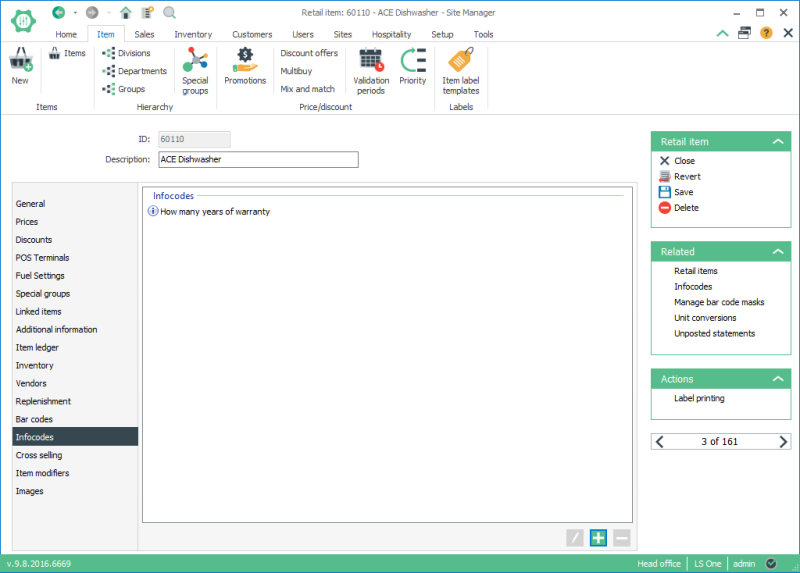
- Select the Add button
 ;
; - In the New link window select the infocode.
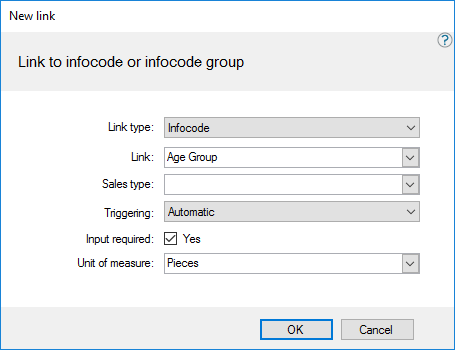
- Press OK to to add the infocode to the item.
Other fields in the window are optional to use. Fields Triggering and Input required are defaulted from the infocode’s setup and can be overridden here.

- The fields Triggering and Input required are fields that are set up with the infocode and can be overwritten here.
- Selecting Value in the Unit of measure field limits the usage of the infocode to this value.
| Last updated: | 27th October 2016 |
| Version: | LS One 2016.1 |

