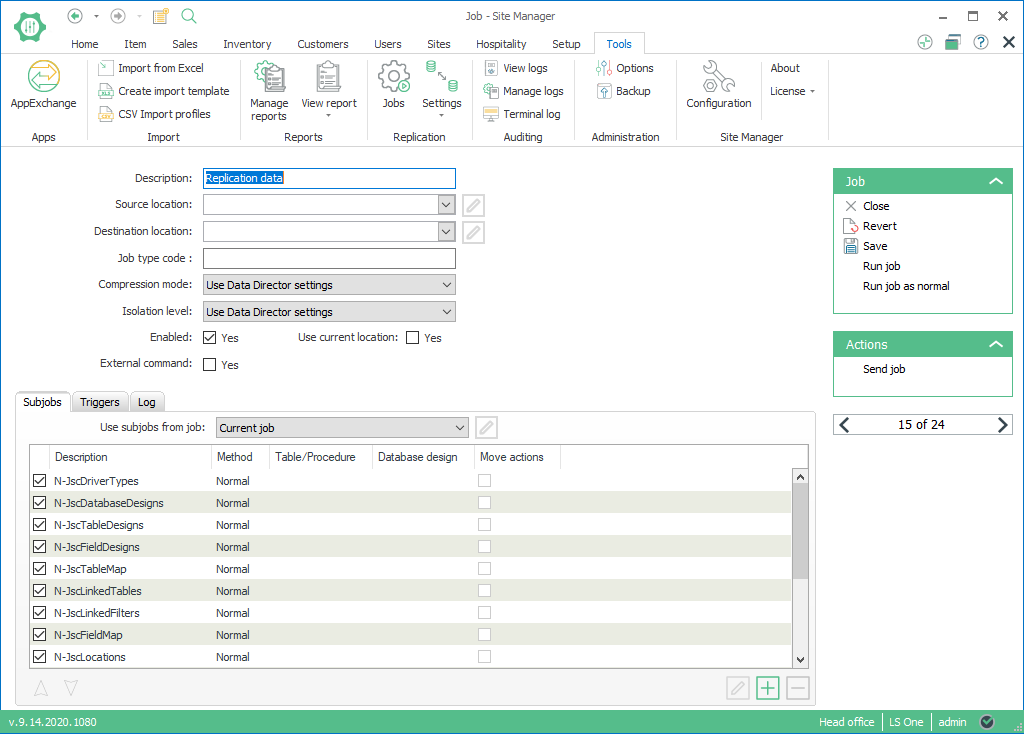
Replicating the Scheduler tables
Introduction
In a multi-store environment, it can be beneficial to replicate the scheduler tables themselves. This enables use of the same scheduler setup across multiple stores.
Note:
If you have loaded the default Replication data (see section Insert Default Replication DataInsert Default Replication Data), the system already has the jobs and subjobs set up as described in this section.
Setup
To set up replication of the scheduler tables do the following:
- Create subjobs for the following tables:
- JscDriverTypes
- JscDatabaseDesigns
- JscTableDesigns
- JscFieldDesigns
- JscTableMap
- JscLinkedTables
- JscLinkedFilters
- JscFieldMap
- JscLocations
- JscLocationMembers
- JscHandlers
- JscJobTypes
- JscJobs
- JscSubJobs
- JscSubJobFromTableFilters
- JscJobSubjobs
- JscJobTriggers
- Create a job and give it a descriptive name, for example “Replication data”
- Add the subjobs created in step 1 to the job.
- Important: Reorder the subjobs in the job so that they appear in exactly the same order as listed in step 1. This is required because the Scheduler table uses SQL Server foreign keys to ensure integrity of their data.
Define source and destination locations for your job as required and set up scheduling as needed.