Generate from an existing Transfer order
Inventory >Transfers > Orders / Requests > Generate from an existing transfer order
What is the dialog used for?
- Create a new transfer order / request from an existing transfer order
Transfer orders can be searched for in a filtered search.
 Search filter
Transfer orders can be searched for in a filtered search. One filtering line is added for each type of filter. You can even save your preferred filtering settings and they will be available next time you open the view.
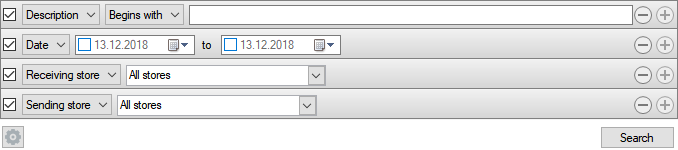
| Fields & buttons | Description |
|---|---|
| Description |
|
|
Select a filter type for each search filter line. Check the box to use the search criteria. |
| Fields & buttons | Description |
|---|---|
| ID | Displays transfer order ID. |
| Sending store | The store that sent the items in the original transfer order |
| Receiving store | The store that received the items in the original transfer order |
| Sent | The date the transfer order was sent. |
| Received | The date when the transfer order was received |
| Button: Next |
Click this button to review and edit the settings for the new transfer order before it is created. |

- To be able to create a transfer order/request for all stores, permission Manage transfers for all stores needs to be granted when the Site Manager is configured to be on a specific store.
- If the permission Manage transfers for all stores is denied the store can only select from transfer orders that are sent from the local store when generating a transfer order from a transfer order.
- If the permission Manage transfers for all stores is denied the store can only select from transfer orders which receiving store is the local store when generating a transfer request from a transfer order
Example:
Store A (the sending store) transfers inventory to store B (the receiving store). Later in time store B likes to have the same items transferred again and generate a transfer request based on the old transfer order. When store B selects to generate a transfer request from a transfer order they can only select from transfer orders which receiving store is store B if the permission Manage transfers for all stores is denied.
See also
| Reviewed: | January 2018 |
| Version: | LS One 2018 |

