Adjustment Line Dialog
Inventory > Journals > Adjustments/Reservations/Parked > Edit a journal > Add a line to the journal

This dialog is used to add lines to all types of journals;
- Inventory adjustment
- Stock reservations
- Parked inventory
What is the dialog used for?
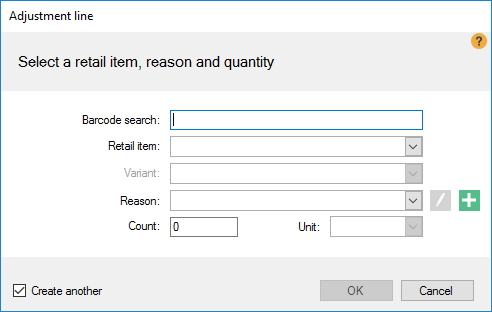
| Fields & buttons | Description |
|---|---|
| Barcode | Type or scan in the item's barcode. |
| Retail Item | Select a retail item from the list. |
| Variant | Select a variant from the list. |
| Reason | Select the reason for the inventory movement from the list. |
 Edit Edit |
Edit the selected reason code for the inventory movement. |
 Add Add |
Add a new reason code for the inventory movement. |
| Count | Type in the number of item units that are being adjusted. Negative numbers move items from the main inventory and positive numbers move inventory from the main inventory. |
| Unit | Select the unit that the item is measured in. |
See also
- Inventory Journals
- Inventory Adjustments View
- Inventory adjustment view
- Stock reservations
- Stock reservation view
- Parked Inventory
- Parked inventory view
- Reason Code Dialog
- Reason Codes View
| Reviewed: | September 2017 |
| Version: | LS One 2017.2 |

